
AI paperwork copilot for service teams
Turn one messy field note into office-ready work.
ServiceBrief transforms voice notes, texts, emails, and technician shorthand into a polished service report, a prioritized follow-up, and a quote opportunity before important details disappear.
No credit cardAbout 30 secondsPrivate preview
Try it with one real note
Your personalized result is locked until you submit the form.
Paste a real or anonymized field note. Complete the quick form and we'll email back a personalized sample: not a generic demo, not a template, and no credit card.
- A clean service report from your note
- Follow-up or quote signals the AI found
- A customer-ready summary you can judge
Submit the form to unlock
No loginNo credit cardDelivered by email
Missed calls still become work
A missed call becomes a job brief.
Give the office a company number. When a customer calls and nobody picks up, the voicemail is not left sitting on a phone. ServiceBrief turns it into a job-ready brief: who called, what they need, and what to do next.
Coastal Air & Heat
Office line
(831) 329-0257
Recents
Sarah M.Missed+1 (415) 555-0182
Voicemail · 0:18
“No heat upstairs since last night. Tenant home all day. Please call back.”
ServiceBrief
Job brief createdJOB-1108
No heat — upstairs zone
- Customer, callback, and issue captured
- 123 Maple Ridge Dr added to the job
- Follow-up queued so the lead does not vanish
The office reviews the brief before anything is dispatched or sent.
Works with your CRM
Implementation with your CRM is easy.
Keep the system your office already runs. ServiceBrief sits beside it, so approved reports, follow-ups, and quote drafts land in Jobber, Housecall Pro, ServiceTitan, Salesforce, Zapier, and other CRMs without a painful migration.
Housecall Pro
Salesforce
ServiceTitan
HubSpot
Zapier
Zoho
No rip-and-replace
Your CRM stays the system of record. ServiceBrief fills in the paperwork your techs never want to type.
Connect in days, not months
Start with webhook, Zapier, or export. Map the fields you already use—no rebuild of jobs, customers, or dispatch.
Only approved work syncs
Reports and quotes reach the CRM after a person reviews them. Nothing customer-facing sends itself.
From field note to finished work
The sample shows the exact transformation.
Your tech talks the way they already do. ServiceBrief turns the messy version into something your office can review and act on.
Raw note
“AC warm upstairs, capacitor weak, swapped it. Coil pretty dirty. Customer asked what maintenance costs.”
ServiceBrief output
- Service report - issue, diagnosis, work completed
- Follow-up - coil cleaning reminder
- $Quote draft - maintenance plan opportunity
Nothing reaches the customer until you approve it.
Built for unreliable signal
No signal? Keep work moving.
Weak coverage should not slow your team down. ServiceBrief keeps work moving offline and syncs everything when your connection returns.
Basements, rooftops, and remote sites stay productive.
OfflineWork saved on device
- 01
Keep working
Capture notes and update details without a connection.
- 02
Saved offline
ServiceBrief keeps your progress ready on the device.
- 03
Synced when connected
Once signal returns, your work syncs automatically.
Connection restoredWork synced and ready for the office
Three steps. One useful result.
Paste one real note
Use a technician note, customer email, voicemail summary, or messy job update.
ServiceBrief structures it
The AI turns rough language into report details, next actions, and quote signals.
You unlock the result
Submit the form to receive your personalized sample by email and see what it caught.
What stays organized
Enough structure for the office. Almost no extra work for the field.
AI job intake
Classify calls, voicemails, emails, and notes into new jobs, callbacks, quote discussions, or updates.
Technician reports
Turn voice notes into structured reports with diagnosis, work completed, parts, tests, and summaries.
Follow-up workbench
Keep return visits, customer callbacks, maintenance reminders, and unresolved issues visible.
Quote opportunities
Draft quote opportunities from future work, customer requests, and price book matches.
Company knowledge
Use your SOPs, checklists, warranty docs, and price book to guide the AI output.
Review-first workflow
Managers approve reports, customer summaries, follow-ups, and quotes before anything is sent.
Product in action
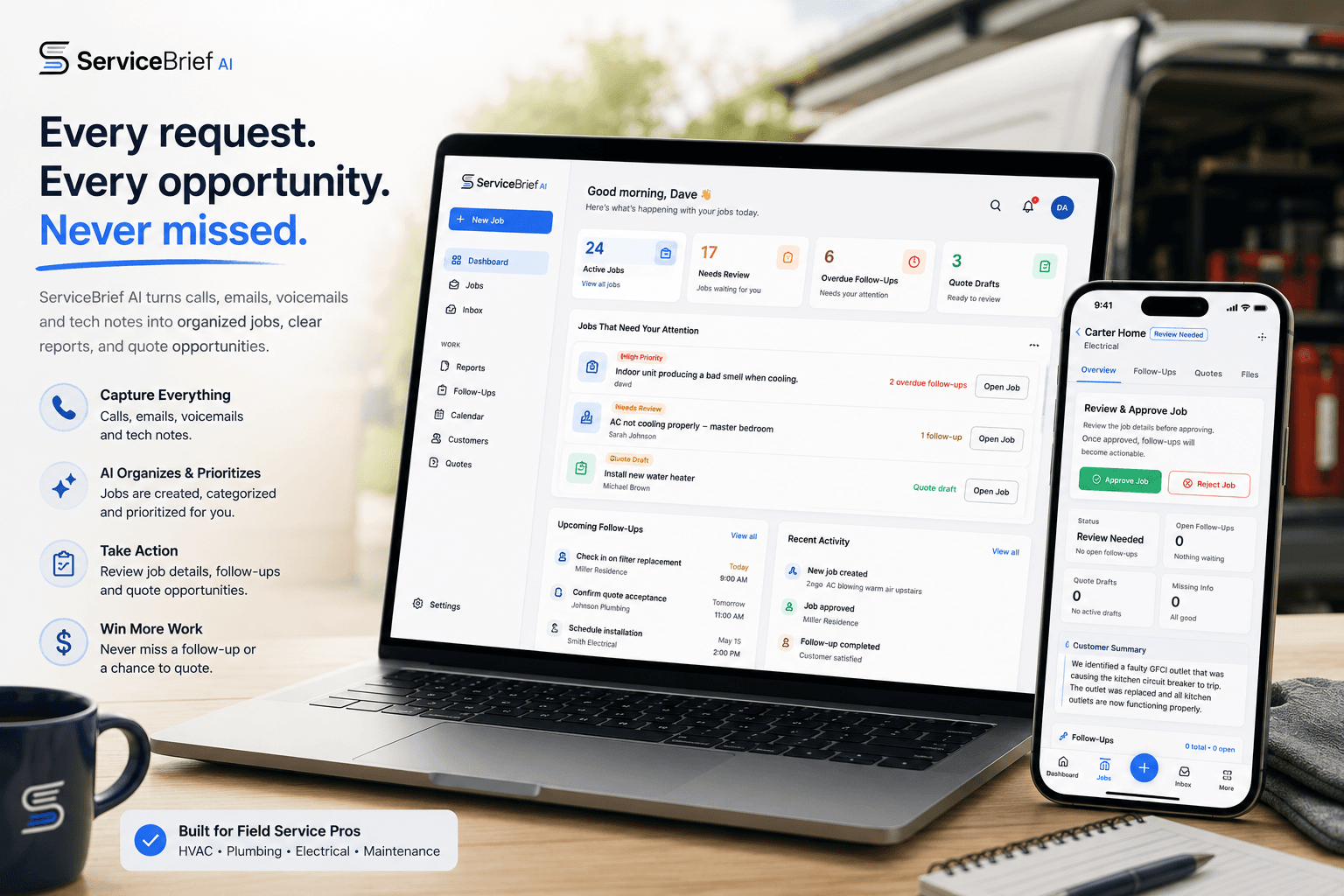
One workspace for requests, follow-ups, and quotes.
ServiceBrief keeps the office focused on what needs review: new jobs, overdue follow-ups, quote drafts, and customer-ready summaries.
3 fieldsto create a personalized sample
No cardstart with proof, not commitment
Review-firstnothing customer-facing sends itself
Your notenot a canned demo result
Pricing
Start free. Upgrade when it fits.
Try the workflow with real jobs first. No credit card required for the trial.
Free Trial
Test with real jobs
$014 days
- 3 users
- 25 jobs
- Basic approval workflow
- No credit card
Starter
Solo operators & small teams
$79/mo
- 3 users
- 100 jobs/mo
- Basic follow-up detection
Pro
Small service companies
$199/mo
- 5 users
- 400 jobs/mo
- Company knowledge base
- Follow-up workbench
Growth
Busy multi-technician teams
$499/mo
- 15 users
- 1,000 jobs/mo
- Advanced company memory
- Priority support
Enterprise
Multi-location operations
Custom
- Custom usage limits
- Multi-branch workspaces
- Custom integrations
- Dedicated onboarding
Quick answers
Clear expectations before you submit.
What does ServiceBrief AI actually do?
It turns customer requests and technician notes into organized jobs with reports, follow-ups, quote opportunities, files, and activity history.
Is this just transcription?
No. Transcription is only the starting point. The AI structures the information into reports, summaries, follow-ups, and quote drafts.
Do technicians need to learn a complicated system?
No. They can record or upload a quick voice note after the job. The office gets the structured version for review.
Does anything send to customers automatically?
No. ServiceBrief drafts the work. A manager or authorized user reviews and approves before anything customer-facing is sent or exported.
Can I test it without creating an account?
Yes. Paste one messy note and we will email back a free sample report so you can see the output first.
Can it use our price book and SOPs?
Yes. You can add price books, checklists, SOPs, warranty docs, and company knowledge so the output follows your business.
Can it process emails and voicemails?
Yes. Incoming emails, missed calls, voicemails, and notes can become jobs, follow-ups, quote discussions, or updates to existing jobs.
Who is it best for?
HVAC, plumbing, electrical, roofing, appliance repair, and property maintenance teams that run on service calls and field notes.
Your note is the proof
Paste one note, submit the form, and unlock a personalized sample in about 30 seconds.
Create my free sample →